I have been experimenting with game development recently. Excalibur seems like a great 2D game engine for Typescript and LDtk is a very intuitive level editor that is compatible.
Sadly, it does not have support for configuring animated sprites, and it seems like at least more complex player animations are unlikely to be on the roadmap.
I wanted to share the solution I chose, in case it helps someone. With this, you can configure animations directly in LDtk and visually select and see the tiles from the tileset in the level editor (however, sadly not the animation itself).
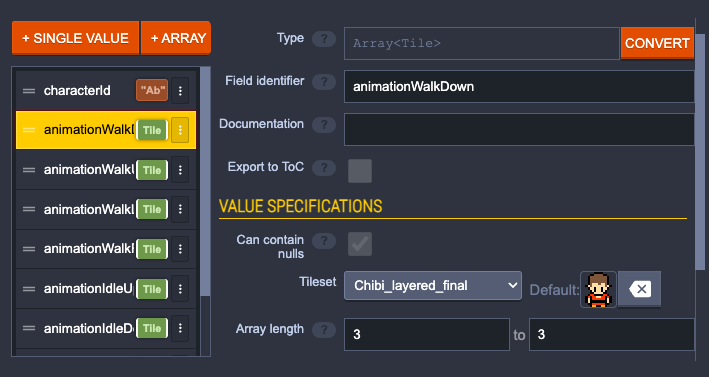
To do so, we set up an entity and add a custom Array<Tile> field for each animation, with a number of values equal to the animation length.
Now, we can configure these animations directly in the editor after placing an entity. If an animation is mission, errors will be shown and selecting sprites for the animation is intuitive because you can see the tile you have selected :).
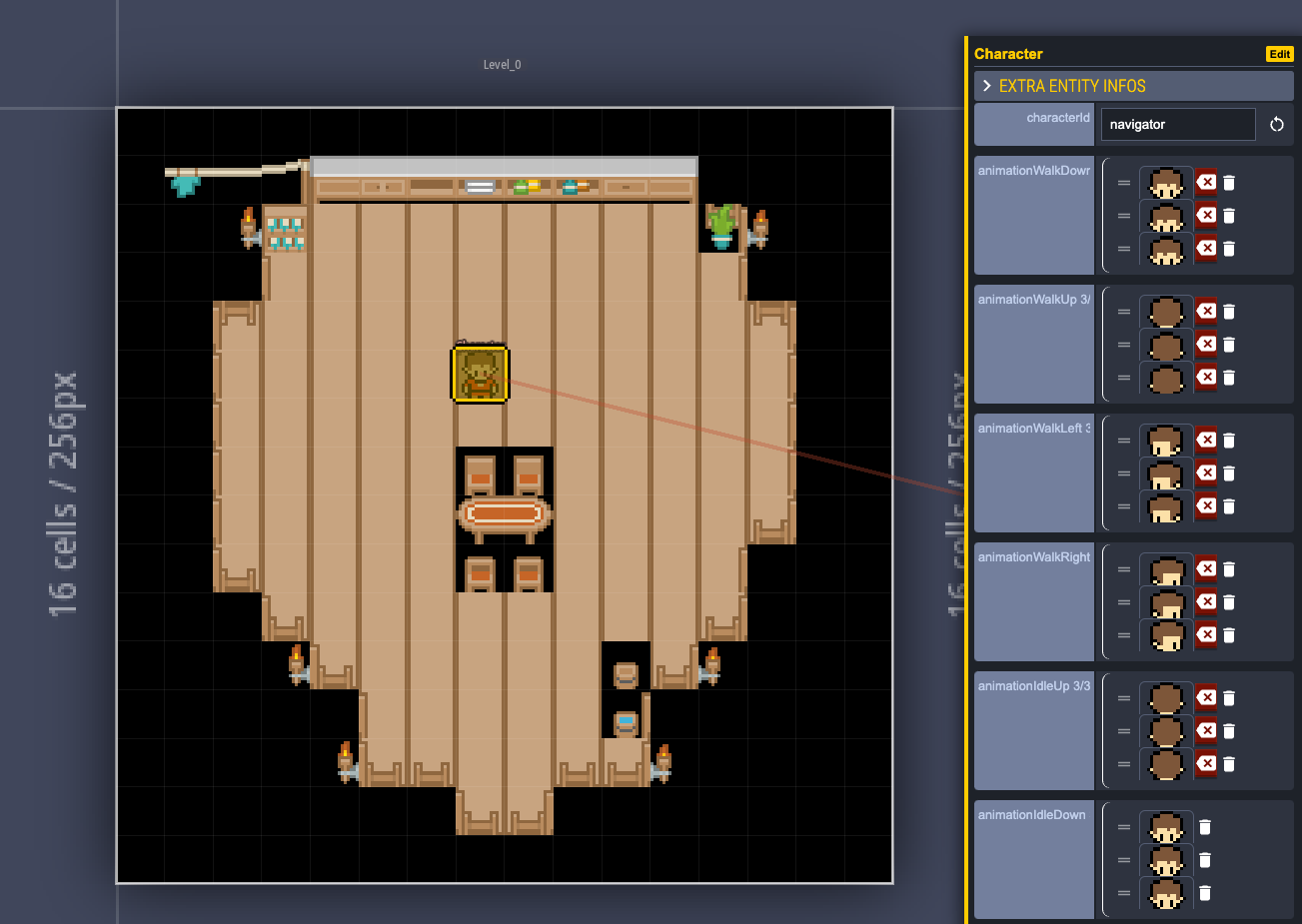
When loading an entity from the exported level, we can create animations based on the information in the fields (but have to manually map the animation names to the field names):
Do you need help with software engineering? I can help and am available on a freelance basis :).
import type { LdtkEntityInstance } from "@excaliburjs/plugin-ldtk";
import * as ex from "excalibur";

interface LdtkFieldInstance {
  __identifier: string;
  __value?: unknown;
}

interface LdtkTileRect {
  x: number;
  y: number;
  w?: number;
  h?: number;
}

// Helper to create animation from LDTK Tile field
const createAnimation = async (
  imageSource: string,
  entity: LdtkEntityInstance,
  fieldName: string,
  animationFrameDuration: number,
  isIdle: boolean
): Promise<ex.Animation> => {
  const tilesField = entity
    .fieldInstances
    .find((f: LdtkFieldInstance) => f.__identifier === fieldName);

  const tiles = tilesField?.__value as LdtkTileRect[] | null;

  if (tiles && tiles.length > 0) {
    // Create frames from tile data
    const frames: ex.Frame[] = [];
    for (const tile of tiles) {
      const sprite = new ex.Sprite({
        image: imageSource,
        sourceView: {
          x: tile.x,
          y: tile.y,
          width: tile.w || 16,
          height: tile.h || 16,
        },
        destSize: {
          width: tile.w || 16,
          height: tile.h || 16,
        },
      });
      frames.push({
        graphic: sprite,
        duration: animationFrameDuration,
      });
    }

    return new ex.Animation({
      frames,
      strategy: isIdle ? ex.AnimationStrategy.Freeze : ex.AnimationStrategy.Loop,
    });
  }

  // Fallback: use the entity's main tile as a single-frame animation
  const entityTile = entity.__tile;
  if (entityTile) {
    const sprite = new ex.Sprite({
      image: imageSource,
      sourceView: {
        x: entityTile.x,
        y: entityTile.y,
        width: entityTile.w || 16,
        height: entityTile.h || 16,
      },
      destSize: {
        width: entityTile.w || 16,
        height: entityTile.h || 16,
      },
    });

    return new ex.Animation({
      frames: [{
        graphic: sprite,
        duration: animationFrameDuration,
      }],
      strategy: ex.AnimationStrategy.Freeze,
    });
  }

  throw new Error(`No animation data found for ${fieldName}`);
};